
Keep Your Wi-Fi On: The Best UPS for Router and Fiber (2026)
Here is the quiet truth of modern outages: the lights going out is an inconvenience, but the Wi-Fi going out is what actually hurts. Fiber lines usually stay live through a power cut—the fiber itself carries no electricity—but the ONT (the little box the fiber plugs into) and your router both need wall power. Cut those 15 watts and you lose work calls, streaming, news, and every “power outage map” you’d want to check. Keeping the internet alive is the single cheapest piece of outage prep that exists. This is the guide.
- Most people: a LiFePO4 DC mini-UPS (~88–100 Wh, $60–100 / R1,200–1,600) plugs between wall and router and silently carries ONT + router for 4–6 hours.
- Already own a power station? Don’t buy anything—its DC/car-port/USB-C output runs a router for a day. See the station guide.
- Avoid the classic lead-acid computer UPS unless it’s your only option: two wasteful conversions, batteries dead in ~2 years, and often only 1–2 hours anyway.
- The one spec that matters: voltage match. Check your router’s adapter (usually 12 V, sometimes 9 V) and buy a UPS that outputs it natively.
Why Wi-Fi Is the Cheapest Thing to Save
A fridge fights you for hundreds of watts. A router asks for ten. That asymmetry is the whole opportunity:
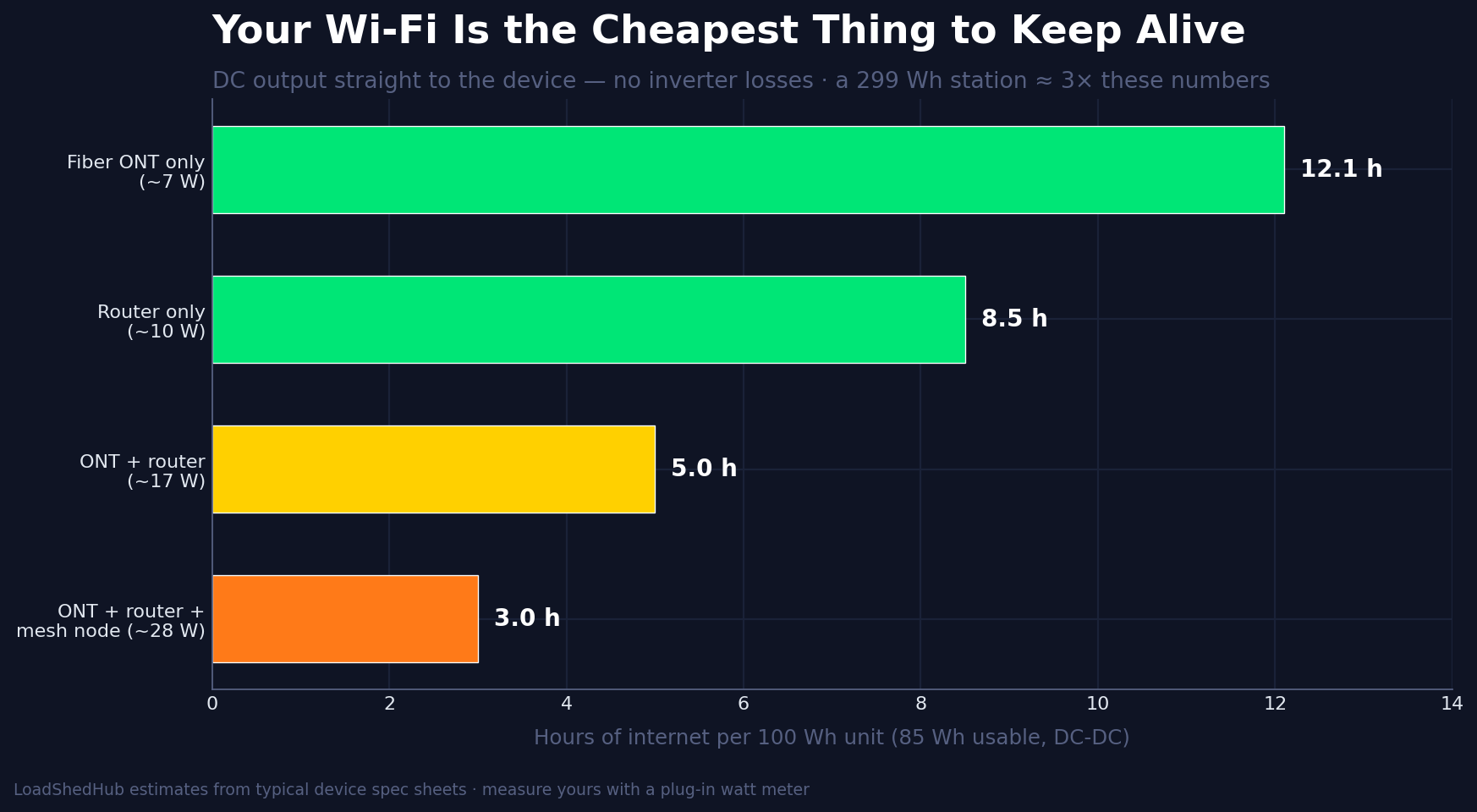
For the price of a takeout dinner, a small DC UPS buys 4–6 hours of internet during load shedding or a storm cut. Double the battery and you cover a working day. That’s the entire cost of staying employed, informed, and entertained through a typical outage—the South Africa guide treats router backup as the first rung of the load shedding ladder for exactly this reason.
The Three Ways to Do It
1. DC mini-UPS (the modern answer). A small LiFePO4 brick with DC output barrels and USB ports. Wall power keeps it topped up; when the grid drops, it takes over in milliseconds—your router never reboots. Efficiency is ~90% because electricity stays DC end to end. The Gizzu line made this category famous in South Africa; dozens of equivalents now exist everywhere.
2. Your power station’s DC outputs (the free answer). Every station worth owning has a 12 V car socket, USB-C PD, or a 5521 barrel output. A 286 Wh unit runs a router-and-ONT pair for roughly 15 hours—run the exact math in the runtime calculator. If you already own one for outages, the router problem is already solved; skip to the station picks.
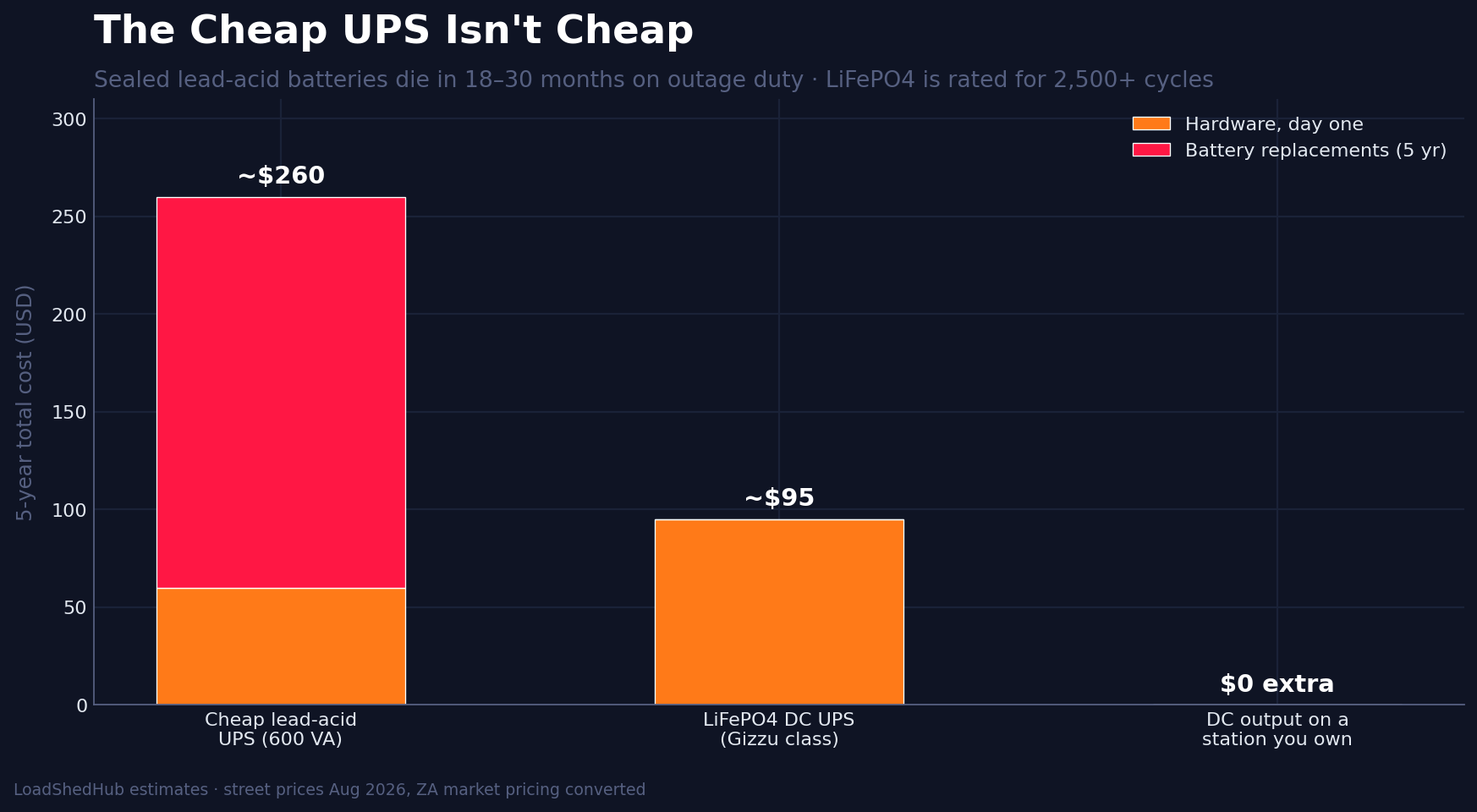
3. Classic lead-acid computer UPS (the legacy answer). It works out of the box with any AC plug, but it inverts 12 V DC up to 230/120 V AC, and your router’s adapter immediately converts it back down to 12 V DC—losing ~25% of your battery in the round trip, while powering an inverter that itself drains the pack. And sealed lead-acid batteries on standby duty die in 18–30 months. Up close it’s the most expensive way to buy the least runtime:
Buying Checklist (Two Minutes)
- Match the voltage. Read the router and ONT adapters: 12 V is most common, 9 V appears on some ISP gear, 5 V on some mesh nodes. Good DC UPSes ship a bag of interchangeable tips covering all three.
- Size the battery. Add up the watts (router ~10 W, ONT ~7 W), multiply by the hours of outage you actually face, then add 30%. For a 17 W pair through a 4-hour stage-6 block: 17 × 4 × 1.3 ≈ 90 Wh. Conveniently, that’s the standard mini-UPS size.
- Insist on LiFePO4. 2,500+ cycles means a decade of daily cycling; older lithium chemistries and lead-acid won’t survive daily load shedding.
- Pass-through charging is the feature, not a bonus. The UPS must run the router while charging from the wall, forever, without you touching anything. You install it once in 2026 and forget it exists.
- Watch the amp rating. Add your devices’ amps (e.g. 12 V × 1.5 A = 18 W): the UPS’s per-port limit should exceed the sum with margin.
The Picks (2026)
Regional buttons open local retail for your country — prices move; check the voltage tips included before ordering. “Gizzu-class” means any reputable 88–100 Wh LiFePO4 DC UPS with pass-through charging.
Install It Right (Ten Minutes, Once)
- Unplug the router and ONT wall adapters; note their voltages.
- Match the DC tips (12 V for most), plug wall power into the UPS, UPS outputs into both boxes.
- Test the switchover: pull the wall plug. Nothing should reboot; Wi-Fi stays up. If either box restarts, the tip polarity or voltage is wrong—fix it now, not during stage 6.
- Label the cables. Future-you, in the dark, will say thanks.
One Device Saved Is a Habit Started
The router UPS is usually the first backup-power purchase people make—and the right one, because it teaches the sizing math on a device small enough to be forgiving. The next steps scale the same logic: phones and laptops (a mid-size station), fridge and lights (the station guide—plus the food-safety clock and the rechargeable light picks), whole-day outages (generator vs power station). If outages are a scheduled part of your week, the full playbook is in the South Africa guide; UK readers facing storm cuts—including the compensation you’re owed—start here. And everything fits into the master outage checklist.
Next: best portable power stations | runtime calculator | generator vs power station | the complete checklist